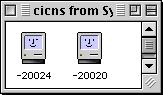
Mac OS 8 Easter Egg - Different Mac Face
Open ResEdit. Click out of the splash screen. Now, in the Open dialog, browse your way to the System Folder and choose the System file. Click OK in the warning dialog. Open up the cicn resource. There will be an ID called -20024. Double-click on it. Study the face. Close the picture editor, and open up the -20020 resource. Study this face carefully. Notice anything? If you give up, the -20024 resource face is winking. I heard somewhere that on bootup, the face would wink. But Apple thought that might be offensive to other cultures, so they removed the code but left the icon.
| User Rating: |
7.5
7.5/10 with 17 votes
|
| Contributed By: |
JeronXZ on 11-24-2000 |
| Reviewed By: |
Webmaster |
Special Requirements: ResEdit, Mac OS 8.0, and a sharp eye
Pictures and Videos
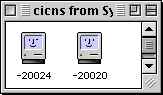 |
| The egg in 8.1 |
Do you have another one?
Send us a picture or video of this Egg!
Comments