DVD Easter Eggs | Software | Movies | Music | TV | Books | Art Bloopers | Drink Recipes
[Eeggs.com Logo] The Easter Egg ArchiveTM
EEGGS.COM
Google
Web eeggs.com
Home > Software > Hardware and Electronics > Color Computer 2 (TRS-80) Easter Eggs Add an Egg | Help | Discussion
   
Color Computer 2 (TRS-80) - Developer Picture
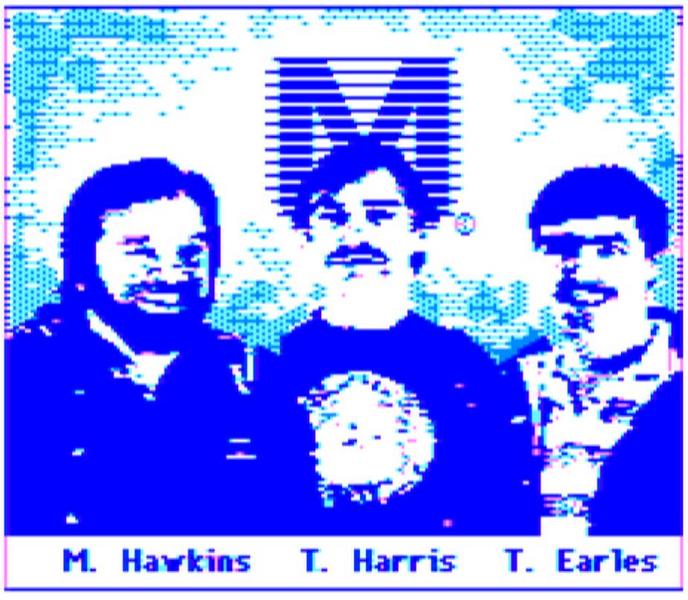
Hit the red reset button on the back of your Color Computer 2 and at the same time hold your control, shift and alt keys (honestly I don't recall 100%, but it is three keys something like that) and you'll see a full color picture of the developers. The reason this happened is that the Color Computer 2 had just SLIGHTLY more than 4K of ROM, and it was cheaper to use a second 4K ROM chip than a special sized chip. To not waste that extra memory, they hid this picture. I think it is truly awsome, especially on such an old computer. Worth buying one at a flea market for $5. Long Live TRS-80's!
Special Requirements:
A TRS-80 Color Computer 2 microcomputer (an oldie)
Avg. Rating:    6.8 of 10 - (26 votes cast)
Your Rating:   
Contributed By:
kcuhC on 05-22-2001
Reviewed By:
Webmaster

Pictures Click on the thumbnails for a full-size image, or send in your own
The Picture
The Picture
Comments:
netcat writes:
The key sequence works EXCLUSIVELY on the COCO 3 and none other. Never did never will (regardless of what others tell you) The process is press (AND HOLD) CTRL + ALT key at the same time and while holding them reach behind your COCO3 with your other hand and press the reset button I have captured the image you can view it here. http://www.780tech.com/3.jpg Regards. Tony
3 of 3 people found this comment helpful. Did you? Yes
elvencows writes:
My TRS-80 color computer 2 doesn't have those keys. It only has a shift key, up and down arrows, enter, and break. those are the closest keys to the ones you mentioned and i cannot find any combination of them to make it work. Any help?
1 of 1 people found this comment helpful. Did you? Yes
Josh Santos writes:
This egg isn't for the Color Computer 2; it's for the Color Computer 3.
1 of 1 people found this comment helpful. Did you? Yes
OldSchoolCPU writes:
See the other egg that's listed. I owned and used a CC2 and 3 for a decade and the picture was in there for that same reason, it's just on the CC3 not the CC2. And it was a monochrome image as well. The image, referred to in the community as "The Three Magi" was of the three principal designers of the new CC3 machine. These guys still work at Motorola. The Magi are M. Hawkins, T. Harris, and T. Earles. Yes this is all from memory. :) I'm sure some web site has a picture posted, go have a look.
2 of 3 people found this comment helpful. Did you? Yes
Josh Santos writes:
What is the logo behind where they are standing?
1 of 1 people found this comment helpful. Did you? Yes
Claude writes:
I owned one of these computers, way back in the distant past. I saw that picture, but it was my understanding that it was a picture of 4 hackers who were wanted by the FBI.
1 of 2 people found this comment helpful. Did you? Yes
gman4dx266 writes:
Does anyone know the correct buttons that must be pressed in oreder to display any type of picture on the TRS-80 Color Computer 2? I have one of these and just want to see the picture :-). If Anyone could help it is all appreciated!!
0 of 0 people found this comment helpful. Did you? Yes
rimfire writes:
Somewhere I still have a Color Computer, but I don't use it anymore because it doesn't network well. :) I don't remember the key combination, but it works on any Color Computer with "Extended Color Basic." On the early model(s) it was an add-on chip; on the CC3 "ECB" came standard.
0 of 0 people found this comment helpful. Did you? Yes


Register - My Settings - FAQ - Privacy Policy - About Us - Contact Us