Alps Pointing Device Driver Easter Egg - Credits
1. Open the Mouse control panel.
2. Click the Alps logo in the bottom-right corner of the window.
3. Hold the Ctrl key and double-click the picture in the bottom-left portion of the about window.
In the top textbox, the credits appear.
| User Rating: |
5.5
5.5/10 with 62 votes
|
| Contributed By: |
EggMaster on 06-27-2002 |
| Reviewed By: |
Webmaster |
Special Requirements: Alps Pointing Device Driver
Pictures and Videos
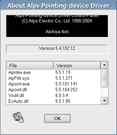 |
| Alps credits scroll by |
Do you have another one?
Send us a picture or video of this Egg!
Comments

