DVD Easter Eggs | Software | Movies | Music | TV | Books | Art Bloopers | Drink Recipes
[Eeggs.com Logo] The Easter Egg ArchiveTM
EEGGS.COM
Google
Web eeggs.com
Home > Software > Application Software > Adobe Image Ready 7.0 Easter Eggs Add an Egg | Help | Discussion
   
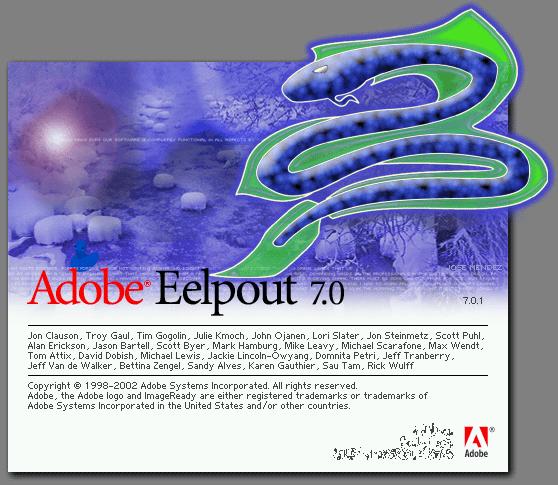
Adobe Image Ready 7.0 - Eelpout
Once ImageReady starts, hold the Ctrl key.
The screen behind should change to say 'Adobe Eelpout' over the picture of the creature.
Special Requirements:
Adobe ImageReady 7.0
Avg. Rating:    7.5 of 10 - (37 votes cast)
Your Rating:   
Contributed By:
Rachel A. on 06-08-2004
Reviewed By:

Pictures Click on the thumbnails for a full-size image, or send in your own
Image Ready 7 easter egg
Comments:
turdman writes:
Hokay. First things It also no longer says Adobe ImageReady, It says Adobe Eelpout. Hokay now that we have that down, I went to dictionary.com, and looked up Eelpout. It is a bottom dwelling fish with an elongated body and a large head. Hokay. So with this, I can conclude that it is not a SERPENT, it is an EELPOUT.
10 of 11 people found this comment helpful. Did you? Yes
king karhu writes:
if you follow the directions for this egg with Imageready CS you will get a different screen with a ship called Taconite with Taconite written on the screen
4 of 5 people found this comment helpful. Did you? Yes
WaPam writes:
In Photoshop7, holding the control key down and following steps in body of this egg, you get a different "help" screen called Lquid Screen with a different pic, a combo of shift / control does the same thing
5 of 8 people found this comment helpful. Did you? Yes
iceman writes:
in 8.0 a big oil tanker boat comes up
3 of 4 people found this comment helpful. Did you? Yes
PickpocketPixie writes:
You can get the same effect by simply holding CTRL alone.
2 of 2 people found this comment helpful. Did you? Yes
miss_mimic writes:
A similar thing happens in ImageReady 2.0- follow the same directions, and the Help About screen now has pretty pictures of a ducky!!!
2 of 3 people found this comment helpful. Did you? Yes


Register - My Settings - FAQ - Privacy Policy - About Us - Contact Us