Photoshop Easter Egg - A Different About Dialog
1. Open Adobe Photoshop of any version, or Image Ready.
2. Press on Help, and click on About while pressing Ctrl.
3. See the new about dialog.
(Every versions of Photoshop, and Image Ready has a difference dialog, and image. Photoshop, and Image ready has a different image, but has the same theme.)
This worked on all Photoshops, and Image Readys I had.
(7, CS, and CS2)
Special Requirements: no reqs known to me.
Pictures and Videos
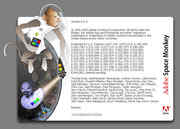 |
| The alternate credits in CS2 |
Do you have another one?
Send us a picture or video of this Egg!
Comments

