Adobe Photoshop 8 Easter Egg - Funny Comments in Credits Screen
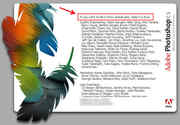
Open up photoshop. After it has loaded, go to help> about photshop.
When that window opens up, click once with your mouse just abouve the word "Protected" on the first line and just below the word "Version 8.0".
Then wait for the credits to start scrolling. Hold Alt to make them speed up.
When the credits reach "In memory of Tim Marrony", the "Version 8.0" text will go and will be replaced by "Photshop", then "In managed Colour", and then after that, a lot of random comments.
I found this by chance when trying to get the space monkey thing to work.
The comments are really funny, enjoy :D
| User Rating: |
8.0
8.0/10 with 1 votes
|
| Contributed By: |
Anonymous on 01-01-2008 |
| Reviewed By: |
MonicaIngram |
Pictures and Videos
 |
| Adobe Photoshop 8 - Funny Comments in Credits Screen |
Do you have another one?
Send us a picture or video of this Egg!
Comments

