|
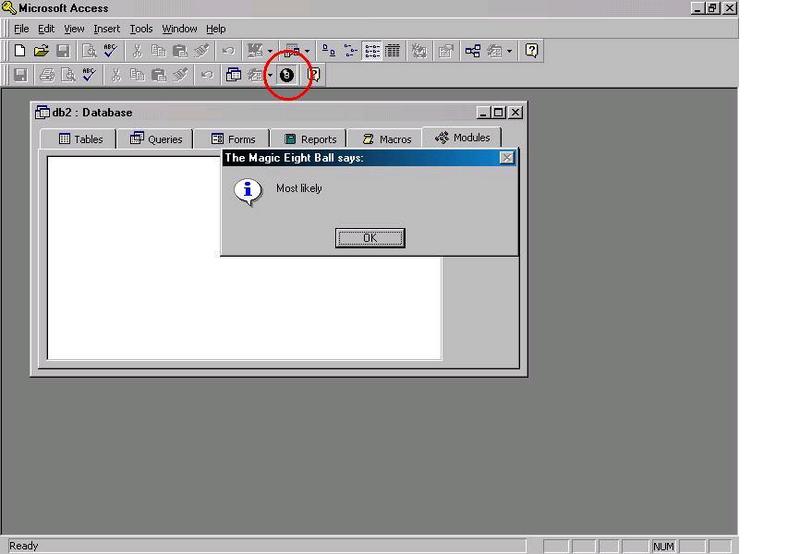
MICROSOFT ACCESS Easter Egg - Access 2000 Magic Eight Ball
With thanks to Aaron Doucet who found this egg for Access 97...The same thing works in Access 2000.
Instructions: 1. Either create a new database, or use an existing one. 2. Create a new Macro. 3. Without entering any commands, save the macro with the name: Magic Eight Ball (case insensitive) 4. Close the macro. 5. Now, drag the macro you just created up to the toolbar. It will create an Icon that looks like a magic eight ball. 6. Ask yourself a question and click on it!
Pictures and Videos
Do you have another one? Send us a picture or video of this Egg! CommentsMara writes:
I can create the icon, but after I click on it my computer crashes... interesting.
105 of 122 people found this comment helpful. Did you?
ap1 writes:
To remove the magic 8 ball button from the toolbar:
1. right-click on the toolbar.
2. click on customise.
3. click on 'toolbars' tab.
4. select 'database' (dont click on the tick, click on the writing.)
5. click on reset.
6. click OK.
The magic 8 ball icon should now have gone. If not, reset other toolbars which have ticks next to them.
I had to work this out when I did it at school!
76 of 83 people found this comment helpful. Did you?
Roden writes:
I have the icon on the tool bar, I click on it and nothing happens. I have the SR-1a patch installed.
72 of 79 people found this comment helpful. Did you?
MtEverest writes:
Running Access 2000 SR1 on Windows 2000: No crash, but nothing happens.
40 of 45 people found this comment helpful. Did you?
Jewels writes:
My computer also says "Access has performed an illegal operation and will be shutdown" every time I click on the Magic Eight Ball.
29 of 30 people found this comment helpful. Did you?
Jack Frost writes:
You must first go to the MS site and download a patch first or else the egg will crash your system.
28 of 32 people found this comment helpful. Did you?
Izhido writes:
It doesn't seem to work in Office XP. It shows a Macro icon with the message "Magic Eight Ball" in it.
22 of 24 people found this comment helpful. Did you?
grupshig writes:
I really need this, I have been finding it impossible to crash Access.
14 of 15 people found this comment helpful. Did you?
the cobra writes:
It made the 8 ball come up but if I clicked on it nothing happened.
I removed it by deleting the macro then right clicking on the blank space next to the 8 ball clicking on the customize button that came up then right clicking on the magic 8 ball and clicking delete
11 of 11 people found this comment helpful. Did you?
Michael Josh writes:
Now you tell me. My crashguard saved my system but now I cannot delete the magic 8 ball icon from my toolbar. Also, what is the name of the patch that I need to download from the MS site? Help!!!
5 of 6 people found this comment helpful. Did you?
William writes:
Every time I Click on the Magic Eight Ball in Acess 2000 it causes my computer to crash
4 of 4 people found this comment helpful. Did you?
Campbell Krueger writes:
I'm on ME with Office 2000 Premium, and it crashes mine too (MSC09.DLL or some file of the sort). I'll try updating...
6 of 9 people found this comment helpful. Did you?
brf writes:
I believe this egg only works with SR1..they removed it with SR1a
5 of 7 people found this comment helpful. Did you?
The Butler writes:
Hmmm, same here. Seems M$ can't even write an easter egg without filling it with bugs...
4 of 7 people found this comment helpful. Did you?
JoliDragon writes:
It works ok on my PC ! No crash !
6 of 12 people found this comment helpful. Did you?
Lorelei writes:
The icon came up fine but then I got a "This program has performed an illegal operation and will be shut down" when I clicked on it :-(
3 of 6 people found this comment helpful. Did you?
dAvIdMuRpHrEe writes:
My program crashed I wonder if they fixed that bug in sr1
1 of 3 people found this comment helpful. Did you?
gnat writes:
This will work without any patch, but only on Windows NT 4.0+. Don't even try on Windows 3.x. Windows 95&98 need the patch. ME doesn't.
2 of 5 people found this comment helpful. Did you?
Elliot Bridgewater writes:
Windows 98 and Office 200 Premium. I got the icon, but my PC crashed once I clicked the picture
1 of 3 people found this comment helpful. Did you?
SavedOne writes:
Can ANYONE please list what patch is needed?? I am on Win 98, and it crashes every time I click the 8-ball. There are dozens of Access patches on the MS site, but which one do I need?? HELP!!
2 of 5 people found this comment helpful. Did you?
Symo writes:
Yes - works fine for me! (win2k SP1, Access 2000 V 9.0.2720)
3 of 7 people found this comment helpful. Did you?
butterhoney12 writes:
Dude, thats awesome! I got it to work,and here's how I did it. When the menu first pops up, click macro on the left side, and create new. Then, go under file and go to save, and save as magic eight ball. then exit out of the cell, but not the other thing. In the other thing, there should be a thing titled magic eight ball, drag it up to the toolbar, and click on it. :) HIH!
2 of 5 people found this comment helpful. Did you?
Bitmaster writes:
What is the name of the patch? "Microsoft Access Security Update KBxxxxxx: Use of Magic Eight-Ball Causes Unexpected Crash of Program"? :p
1 of 3 people found this comment helpful. Did you?
Ken Tucka writes:
To SavedOne
Try reinstalling Access. If you are using the standard edition then it should work. I have Win. 98 and have had no problems with it.
0 of 3 people found this comment helpful. Did you?
Umang writes:
after adding the macro on myu tool bar, it displays a message box saying, "This program has performed an illegal operation" why is this so?
0 of 3 people found this comment helpful. Did you?
no-one writes:
The silly macro won't drag on to the toolbar: what's going wrong?
2 of 9 people found this comment helpful. Did you?
|
||||||||||