DVD Easter Eggs | Software | Movies | Music | TV | Books | Art Bloopers | Drink Recipes
[Eeggs.com Logo] The Easter Egg ArchiveTM
EEGGS.COM
Google
Web eeggs.com
Home > Software > Operating Systems > Palm OS Easter Eggs Add an Egg | Help | Discussion
   
Palm OS - Inchworm
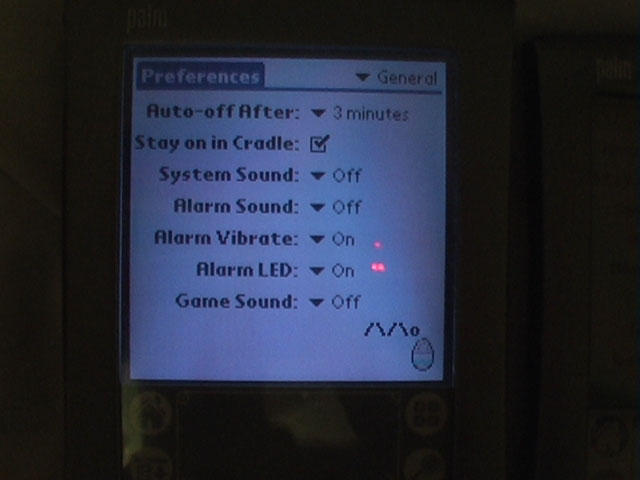
· Tap Applications, then Prefs.
· In the Graffiti writing area, make the # symbol
(a dot followed by a backward capital N).
· After about 10 seconds, it should inch across
the screen (formed of boldface slashes and a
little "o" for the head).
· The little guy will continue to inch across
until you switch to a different screen.
Special Requirements:
Palm OS 3.x
Avg. Rating:    5.6 of 10 - (286 votes cast)
Your Rating:   
Contributed By:
Andre on 10-11-1999
Reviewed By:
Webmaster

Pictures Click on the thumbnails for a full-size image, or send in your own
Be the first to send us your picture of this Egg!
Comments:
DRA writes:
i Could only get it to work under the GENERAL catagory under "Preferences"
8 of 8 people found this comment helpful. Did you? Yes
Lownoise writes:
Isn't working with me with PalmOS v3.3 (Spanish version).
4 of 4 people found this comment helpful. Did you? Yes
Steven M writes:
This works with Palm OS 4.1 as well.
2 of 2 people found this comment helpful. Did you? Yes
notch27 writes:
This Egg worked fine for me with Palm OS 3.3 (USA)
1 of 1 people found this comment helpful. Did you? Yes
Cowboy writes:
I can confirm that this works on a Palm IIIc running Palm OS version 3.5 The information on how to enter the "#" symbol above can be a little confusing, so if you have trouble, I suggest consulting the Graffiti help in the (paper) manual or the Palm OS help file.
1 of 1 people found this comment helpful. Did you? Yes
The floccinaucinhilipilificator writes:
He looks like __o (a little space between the two underscores) then when it moves it looks like /\o so the movement is like so--- __o /\o __o /\o etc.
6 of 12 people found this comment helpful. Did you? Yes
Szereck writes:
This Egg also works in Palm OS v2.0 Pro.
1 of 2 people found this comment helpful. Did you? Yes
brutusis writes:
You can also click on the little 124 tab on the Graffiti space, then select the # sign. Then say "ok" and cancel what pops up.
0 of 0 people found this comment helpful. Did you? Yes
p14nd4 writes:
This is confirmed to work on a Handspring Treo 300 w/ Palm OS v. 3.5.2H6.3, firmware revision 1.21 on Sprint PCS on the General tab of Preferences. The necessary variation is as simple as typing # (blue key + the letter o), since there is no graffiti area.
0 of 0 people found this comment helpful. Did you? Yes
Robbie writes:
yeah i'm not sure what happened but i also saw the taxi drive by during this egg. i was watching tv and i looked down and saw the taxi go across the screen followed by the inchworm going the other way.
0 of 0 people found this comment helpful. Did you? Yes


Register - My Settings - FAQ - Privacy Policy - About Us - Contact Us