DVD Easter Eggs | Software | Movies | Music | TV | Books | Art Bloopers | Drink Recipes
[Eeggs.com Logo] The Easter Egg ArchiveTM
EEGGS.COM
Google
Web eeggs.com
Home > Software > Operating Systems > Mac OS X Easter Eggs Add an Egg | Help | Discussion
   
Mac OS X - Kill Gates
Log in to OS X, and open Terminal. (/Applications/Utilities)
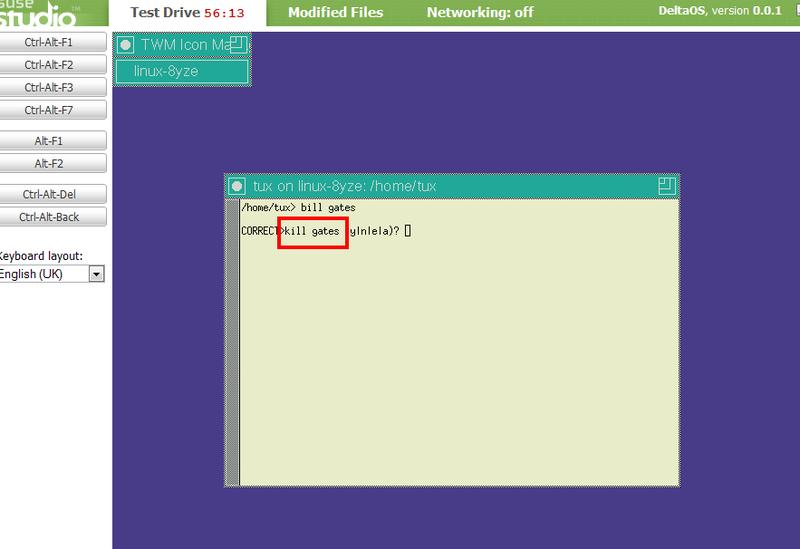
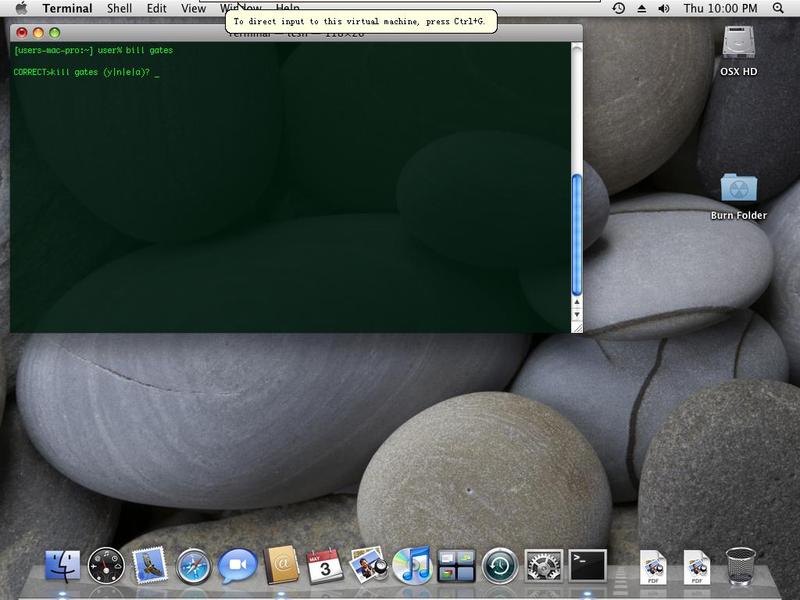
If a session is not open already, open one, and type "bill gates" (caps don't matter), and hit Enter or Return.
You will receive a rather humorous response...
"OK? kill gates?"
For some reason if you type "bill" and then any word it also works (not just with "gates")
You can find this other places too, but I was surprised to not find it on here...It's pretty minor, but it HAD to be intentional...I love Apple's sense of humor!
—Eoban
Special Requirements:
Terminal (included with all copies of OS X)
Avg. Rating:    2.3 of 10 - (475 votes cast)
Your Rating:   
Contributed By:
eobanb on 05-26-2002
Reviewed By:
Webmaster

Pictures Click on the thumbnails for a full-size image, or send in your own
Be the first to send us your picture of this Egg!
Comments:
fabwhack writes:
Neat as it is, it's not intentional. Most *nix shells (like MacOS's Terminal) will attempt to match up any spelling mistake with a known command. "kill" is a Unix command, therefore "bill" is taken as a misspelled "kill". It asks you to verify this - therefore "bill gates" is translated as "kill gates?" Still, the sentiment is nice...
58 of 62 people found this comment helpful. Did you? Yes
jaxbrokenheart writes:
This does not work in Mac OS X Jaguar. They must've somehow taken it out because people thought that Apple put it in there on purpose.
26 of 34 people found this comment helpful. Did you? Yes
KramRM writes:
The terminal perfoms a spell check on commands. There is no "bill" command, so "kill" is the closest spelling. This isn't an intentional egg when mixed with "gates"
19 of 23 people found this comment helpful. Did you? Yes
dramatools writes:
This behavior hasn't disappeared completely, nor is it unique to Mac OS X. In Mac OS X versions prior to 10.2 (Jaguar), Apple shipped the system with the Tenex C Shell (tcsh) as the default shell. This particular shell can be made to correct the spelling of command names by using the command 'set correct=all'. After using that command, the shell will respond to 'bill gates' with 'CORRECT>kill gates (y|n|e|a)?' This works for any UNIX-like operating system with tcsh. Mac OS X 10.2 and later releases ship with the GNU Bourne-Again Shell (bash) as the default shell. Although bash is the default, you can still get to tcsh by running the 'tcsh' command within bash, or by using NetInfo Manager to make it your preferred shell.
13 of 16 people found this comment helpful. Did you? Yes
trojjer writes:
Sorry to disappoint you, but the response "jobs: too many arguments" has got to be a simple coincidence. Either "jobs" is a command in the Terminal, or it has simply been interpreted as one, by the aforementioned SpellChecker. The reason for the "arguments" part just happens to fit in perfectly when talking about Unix, Telnet, etc. terminology - by typing "jobs -1 steve", the program/server misread it, and "believed" that you had entered the "job" command, followed by two arguments, "-1" and "steve". This must be, apparently, an illegal number, which is why you received the error message, stating that you had entered too many of them.
7 of 13 people found this comment helpful. Did you? Yes
djjuice writes:
this is not an egg. any first word in the terminal with the letts "ill" is taken as the kill command in unix. sorry try again
9 of 18 people found this comment helpful. Did you? Yes
koira writes:
in Tiger, it says "Bash Gates?" (as in bash his head in...)
4 of 10 people found this comment helpful. Did you? Yes
marsvin writes:
This is nonsense; Unix shells don't do spell checking (except maybe zsh...), and the command "kill gates" just results in "bash: kill: gates: no such pid".
3 of 9 people found this comment helpful. Did you? Yes
186000 writes:
How silly. For that matter, if you type at the prompt, "jobs steve" you get: Usage: jobs [ -l ]. And upon taking this advice and typing "jobs -l steve" you get: jobs: Too many arguments. I wonder what Apple is trying to tell us.
10 of 32 people found this comment helpful. Did you? Yes


Register - My Settings - FAQ - Privacy Policy - About Us - Contact Us