DVD Easter Eggs | Software | Movies | Music | TV | Books | Art Bloopers | Drink Recipes
[Eeggs.com Logo] The Easter Egg ArchiveTM
EEGGS.COM
Google
Web eeggs.com
Home > Software > Application Software > Adobe ImageReady CS Easter Eggs Add an Egg | Help | Discussion
   
Adobe ImageReady CS - Taconite
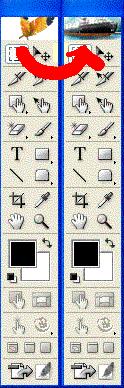
1. Open Adobe ImageReady CS
2. Alt click ''go to adobe.com'' (it's in tools window)
3. The Picture will change to a ship and, if you won't change it back to feathers.
Alt+click ''go to adobe.com'' again to get back usual about screen
Special Requirements:
Adobe ImageReady CS
Avg. Rating:    5.7 of 10 - (11 votes cast)
Your Rating:   
Contributed By:
saule pazare on 08-27-2005
Reviewed By:

Pictures Click on the thumbnails for a full-size image, or send in your own
Ship in Adobe Image Ready CS - Easter Egg
Comments:
lgspirit writes:
Hey.. it works on ImageReady CS2 as well! And I'm not sure if the next part works on CS version, but after you got it changed to a ship, go check out the Help > About ImageReady. Hematite! And looks like someone's signed off on the bottom right. This guy seems to like rubber duckies.
3 of 4 people found this comment helpful. Did you? Yes


Register - My Settings - FAQ - Privacy Policy - About Us - Contact Us