DVD Easter Eggs | Software | Movies | Music | TV | Books | Art Bloopers | Drink Recipes
[Eeggs.com Logo] The Easter Egg ArchiveTM
EEGGS.COM
Google
Web eeggs.com
Home > Software > Application Software > Adobe ImageReady CS2 Easter Eggs Add an Egg | Help | Discussion
   
Adobe ImageReady CS2 - Rubber Ducky Stamp
1. Open Adobe ImageReady
2. Click Help > About ImageReady... (if you're using MacIntosh, you have to go under the "ImageReady" menu to get to About ImageReady).
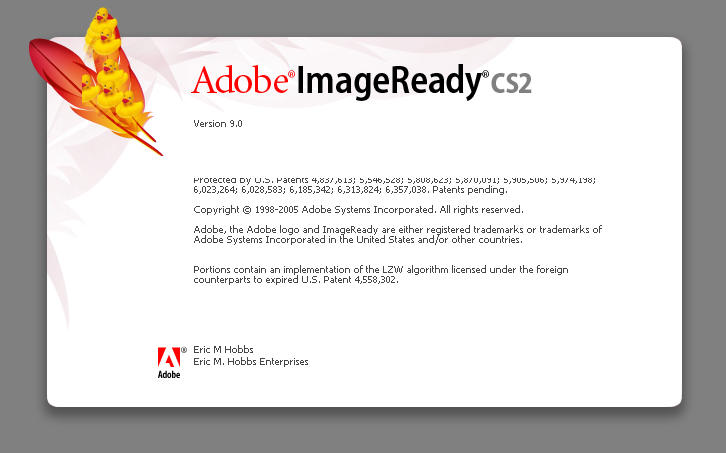
3. A window pops up
4. While holding down the Ctrl key, randomly click anywhere on the side of the about screen with the red feather in the top left corner. (If you're using MacIntosh, you have to hold down the AppleCommand key).
In Windows, to erase the ducks hold CTRL+ALT and your cursor will change to a crosshair. Click on the ducks to erase them (or shoot them?)
Special Requirements:
Adobe ImageReady CS2
Avg. Rating:    8.7 of 10 - (20 votes cast)
Your Rating:   
Contributed By:
lgspirit on 09-01-2005
Reviewed By:

Pictures Click on the thumbnails for a full-size image, or send in your own
Duckies!!!
Duckies!!!
Comments:
AceX writes:
and i mention that there is a limit of only 10 "Rubber Ducky Stamp"s.
5 of 6 people found this comment helpful. Did you? Yes
FayeB writes:
The process is a little different if you're using Mac. It still works, but to get to the About ImageReady splash screen, you go under the ImageReady menu at the top of the screen. Then, you hold down the Apple/Command key (instead of Ctrl) and click with the mouse on the top feather.
3 of 4 people found this comment helpful. Did you? Yes
rabbitdude writes:
If you click two or more times, the rubber ducks eventually go upside-down.
3 of 4 people found this comment helpful. Did you? Yes
rabbitdude writes:
Also works in the alternate about screen. Hold command, click on "ImageReady", Click on "About ImageReady...," release the command key, press it again, and there you go.
3 of 4 people found this comment helpful. Did you? Yes


Register - My Settings - FAQ - Privacy Policy - About Us - Contact Us