DVD Easter Eggs | Software | Movies | Music | TV | Books | Art Bloopers | Drink Recipes
[Eeggs.com Logo] The Easter Egg ArchiveTM
EEGGS.COM
Google
Web eeggs.com
Home > Software > Operating Systems > Mac OS 7.5 Easter Eggs Add an Egg | Help | Discussion
   
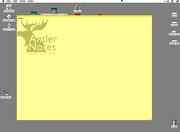
Mac OS 7.5 - Stickies Picture
1. Open a new sticky, one that has nothing on it
2. Without messing up, type "Antler!" (without quote marks)
Special Requirements:
None
Avg. Rating:    5.7 of 10 - (58 votes cast)
Your Rating:   
Contributed By:
Diana C. on 07-15-1999
Reviewed By:
Webmaster

Pictures Click on the thumbnails for a full-size image, or send in your own
new note using option-N then wrote Antler! and pressed<ENTER>
new note using option-N then wrote Antler! and pressed
Comments:
Bonete writes:
Are you sure those are the only steps? Where is the picture supposed to appear?
2 of 2 people found this comment helpful. Did you? Yes
Pyro writes:
This egg is for the "Stickies" program, not Mac OS (some number that I don't care about).
1 of 1 people found this comment helpful. Did you? Yes
Dark Reality writes:
This doesn't work. I use Mac OS 7.5.1 and nothing happened. I hit Stickies from the Apple menu, then File>New Note and followed the steps as typed, but nothing.
2 of 3 people found this comment helpful. Did you? Yes
h2g2Strider writes:
The system doesn't matter, and yes it does work. I just did it on system 9.1.
1 of 1 people found this comment helpful. Did you? Yes
jz4208 writes:
Type it exactly into a blank note. That's where the picture will appear. I use System 7.5(.0) and this worked.
0 of 0 people found this comment helpful. Did you? Yes
JouwNaam writes:
I am running System 7.5.5 on Basilisk II and it didn't work for me. I had to press Enter/Return after typing "Antler!". Hope this helps for anyone who's having the problem. (Also, it is recommended to make your sticky BIG!)
0 of 0 people found this comment helpful. Did you? Yes
The Dork Cheese writes:
This egg will not work if you made a note, typed in it, and deleted its comments; this will only work on a completely fresh note.
0 of 0 people found this comment helpful. Did you? Yes
hyperbowlingball writes:
This is verified to work on System 7.5.3. Open a new sticky note by clicking on the Apple menu, then Stickies. Type in Antler! including the capital "A" and the exclamation point. Then press . If it does not work with one sticky, close that sticky (do not save it), then click File > New Sticky and try again. I think it must also be typed with some haste (i.e. don't let five seconds elapse between each keypress).
0 of 0 people found this comment helpful. Did you? Yes


Register - My Settings - FAQ - Privacy Policy - About Us - Contact Us