Mac OS 7.5 Easter Egg - Resedit Pig Mode
1. Run ResEdit and close the splash screen and/or Open dialog
2. Hold Option + Shift + Command while choosing About ResEdit… from the Apple menu.
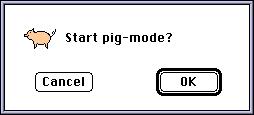
3. A dialog comes up asking if you want to turn pig mode on. Click OK.
4. If ResEdit was run on an old mac like an SE from a floppy, the drive will 'oink' a few times each second.
5. To turn pig mode off, repeat steps 2 and 3.
| User Rating: |
6.0
6.0/10 with 21 votes
|
| Contributed By: |
Vasantha Crabb on 07-15-1999 |
| Reviewed By: |
Webmaster |
Special Requirements: None
Pictures and Videos
 |
| Pig mode in 2.1.3 |
Do you have another one?
Send us a picture or video of this Egg!
Comments