DVD Easter Eggs | Software | Movies | Music | TV | Books | Art Bloopers | Drink Recipes
[Eeggs.com Logo] The Easter Egg ArchiveTM
EEGGS.COM
Google
Web eeggs.com
Home > Software > Hardware and Electronics > Macintosh Classic Easter Eggs Add an Egg | Help | Discussion
   
Macintosh Classic - Secret Startup Disk in ROM
1. Hold Apple Option x o
2. While holding, open the Mac Classic
3. The computer will start up with system 6.0.4
4. Use ResEdit to find names into the new disk on invisible folders
5. Restart your computer the usual way
Special Requirements:
None
Avg. Rating:    6.6 of 10 - (58 votes cast)
Your Rating:   
Contributed By:
Anonymous on 07-15-1999
Reviewed By:
Webmaster

Pictures Click on the thumbnails for a full-size image, or send in your own
Be the first to send us your picture of this Egg!
Comments:
Michael Fincham writes:
DOURO, I hate to say it but you are wrong. The Macintosh Classic was code named the Macintosh XO during development, and was designed as a "diskless" workstation. The startup disk held in ROM has a special combination of system software designed specifically for the Macintosh Classic, and it contains just the components required to connect to an AppleTalk network. Its also very useful if the HDD on your Mac in toast and you need to run repair software. Another tip: If you start up from the disk, on a Mac without an HDD, then go to the apple menu -> then to control panel -> then to Startup Disk, you can set the ROM disk as startup disk and have it start up from ROM without having to hold down Apple+Option+X+O while it starts up. This doesnt have a lot of use on a Classic with a hard disk though :)
5 of 6 people found this comment helpful. Did you? Yes
Maxy David writes:
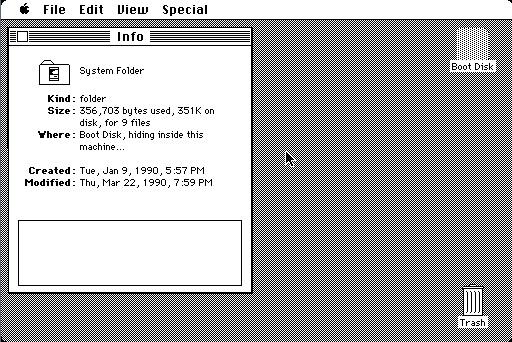
Proof: Select Boot Disk, click File, then get info. It says, "Where: hidden somewhere on this machine..."
5 of 6 people found this comment helpful. Did you? Yes
heeheecunnings writes:
I have *two* Classics. It works on both of them. I think it's awesome!!!!
2 of 3 people found this comment helpful. Did you? Yes
i was here writes:
i've got a mac SE and a mac classic, but my classic is acting up. whenever i start it, it won't load.
0 of 0 people found this comment helpful. Did you? Yes
DOURO writes:
You may have reached the built-in Diagnostic Disk. This is programmed into an extra 128K of ROM memory, and is used to carry diagnostic programs used during burn-in testing and diagnosis. I have a Mac SE that this *may* work on, but I have not tried this yet.
0 of 3 people found this comment helpful. Did you? Yes


Register - My Settings - FAQ - Privacy Policy - About Us - Contact Us