DVD Easter Eggs | Software | Movies | Music | TV | Books | Art Bloopers | Drink Recipes
[Eeggs.com Logo] The Easter Egg ArchiveTM
EEGGS.COM
Google
Web eeggs.com
Home > Software > Application Software > Quark XPress Easter Eggs Add an Egg | Help | Discussion
   
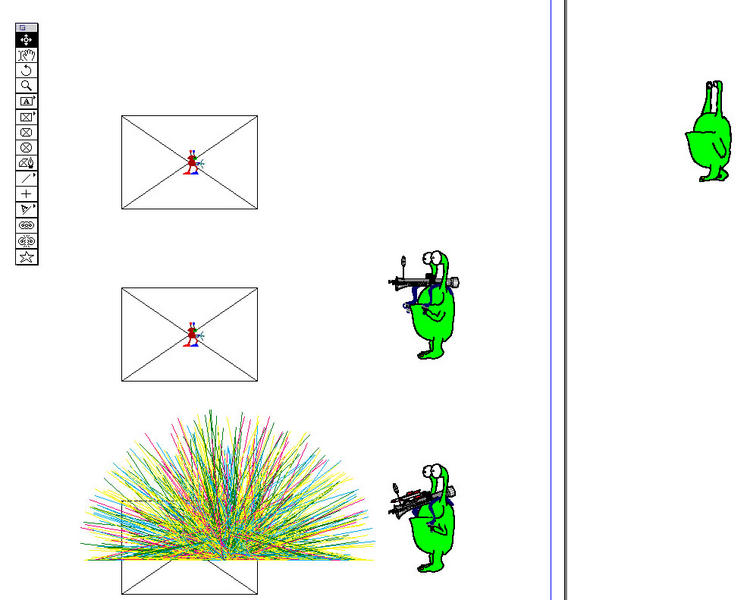
Quark XPress - New Bigger Alien to Delete Old Alien (v4.0)
1. Draw a box in center of screen.
2. Leave plenty of room on both sides for action.
3. Press Shift-Option-Command-K to get original alien.
4. Repeat above sequence at least 5 times.
5. The new alien appears randomly, usually after 5-12 tries.
Special Requirements:
Quark XPress 4.0
Avg. Rating:    7.2 of 10 - (201 votes cast)
Your Rating:   
Contributed By:
Joyce Coffland on 07-23-1999
Reviewed By:
Webmaster

Pictures Click on the thumbnails for a full-size image, or send in your own
the Big Alien ;)    - TRACKMAN
the Big Alien ;) - TRACKMAN
Comments:
dannyboy writes:
Thanks Joyce - I poked around in V4 with Res edit as soon as it shipped to see if they kept the Martian and found the Pict resources and sound files for the new one. I had never been able to find out the secret though. Check it out when you can - there's also at least one or two more I think - one's a Pict of two cats.
11 of 11 people found this comment helpful. Did you? Yes
BigBantha writes:
A bigger alien means you can shoot more stuff.
6 of 12 people found this comment helpful. Did you? Yes


Register - My Settings - FAQ - Privacy Policy - About Us - Contact Us